


You No Longer Need Buy A Bluetooth Keyboard Or Mouse Specifically To Wirelessly Connect To Your Phone Or Tablet
Many of us like to use an external keyboard with mobile devices, and that’s particularly the case with tablets. They are useful for typing similar to what we do with PCs. External keyboards or mouse can also be quite useful for navigating the OS. It’s a nice way to kick back & use your device, specially when watching a video or reading an eBook, as many apps allows you to turn the page or control the video using the keyboard.
As we all know, the main way to connect a keyboard to an iOS or Android device is to get yourself a Bluetooth keyboard. They are not expensive, and you can carry them on the go, which is a huge plus. Another way to do so is to connect the USB keyboard to the charging port of your device. This can work very well, but there are few problems to that:-
-
- It draws power from the device battery.
- It’s cumbersome to connect the cable to the tablet each time. Every…Single…Time
- When you want to get up, you will have to disconnect the cable. Again, every…Single…Time.
That’s why Bluetooth keyboards & mice that most of us use tend to be Bluetooth. If you want to use a fancy keyboard with your iOS or Android device, you must get a Bluetooth one. But what if you already have a nice keyboard you want to use instead? Buying yet another one would be a waste.
You can buy or check the price of the Bluetooth USB hub in the following links:-
Aliexpress
Quickly go to:-
Bluetooth Hubs Come To The Rescue

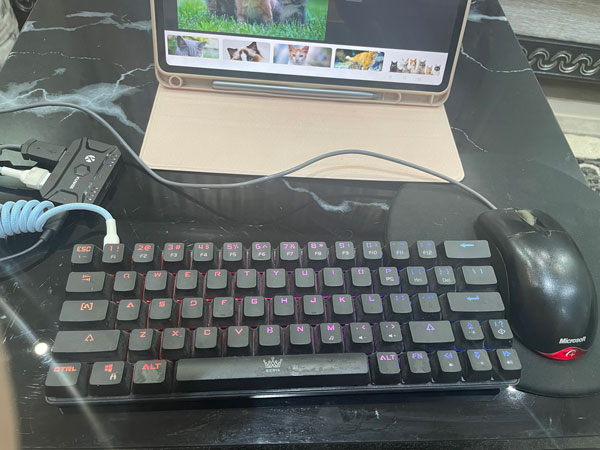
That’s what USB hubs solve the problem. It’s a nice solution I discovered here allows you to connect any keyboard or mouse by acting as an intermediate device between them & your device. It will pretend to be a Bluetooth keyboard & mouse, and manage the pairing & everything related to that for you. All you need to do is to plug it to a power source (the one presented here doesn’t come with a USB adapter), and then plug your wired keyboard & mouse to it. Once you pair the hub with your mobile device, you are off to go. To do that, just press & hold the button at the middle, and it will enter pairing mode. It will appear in your Bluetooth devices as MEIYING_X1_X, where X is the device number on the hub itself. The first device appears as MEIYING_X1_1, and the second as MEIYING_X1_2, and so on.
It’s worth noting that the hub I am using supports up to 8 devices, which is quite neat. You can switch between all these devices by pressing the button on the hub itself. You can also switch between the devices from the keyboard itself too. Just press CTRL + Shift + Alt + X, where X is the device number you want to switch to.

With that solution, I was able to create a small setting where I can write stuff or enjoy having a keyboard & mouse always connected to my device, and without losing the portability of my device, and without having to buy another Bluetooth peripheral specifically for that. It worked well with my iPad M1, as well as my Honor Android tablet.
A Few Things To Know About The Bluetooth USB Hub
- Each Bluetooth USB hub supports up to 8 Bluetooth devices (depending on the hub).
- You can use the hub to connect two keyboard or two mice if you like.
- There’s a 3rd USB port you could use to charge any device you have. Although I found charging from that port to be a bit slow. It’s still useful to power a speaker or something else.
- You can very easily switch between the different devices connected to the hub by using the key shortcut CTRL + Shift + Alt + X (Where X is the device number).
- This solution can also help you turn any USB mouse or keyboard to wireless. A good use for that is for home theatre, where the computer is a bit far from where you sit.
- I tried some other peripherals other than keyboards & mice, and they didn’t work.

The Cons Of The Bluetooth USB Hub
- It’s not exactly portable, since you need to power it via USB.
- If the USB keyboard had additional feature like dedicated volume buttons, you won’t be able to use them. The only way to adjust the volume is using the shortcuts provided by the hub itself.
Similar Devices That Does The Same?

The black USB Bluetooth hub I am featuring here is not the only device that gives you the capability to connect any wired USB keyboard or mouse via Bluetooth. There are other solutions that may work quite well, but I didn’t get to try them yet.
Also, keep in mind that on Aliexpress or Amazon, there’s a device that’s much cheaper than the hub featured here, but one that does something completely different. I once bought one when I wanted another hub, and had to return it (they gave me a refund without having to return it, so it’s all good). This can be confusing, because other one tends to look exactly the same, except it has a different logo at the top, so it’s easy to spot while you shop for the actual hub. Here’s how it looks like:-

You can buy or check the price of the Bluetooth USB hub in the following links:-
Aliexpress
And Finally
For me, finding this little solution was quite the discovery. So I thought I would share it via Tech Fairy. Hopefully this solution will work quite well for you, and see you in another article.
If you like, check out the mobile apps I developed. Including some for iOS, which I hope you find interesting.